Instructions on how to access the NHTSA Pedestrian Safety Training for Law Enforcement
Before you launch the course, carefully read the following instructions.
If you see an Active Content warning message, follow these steps:
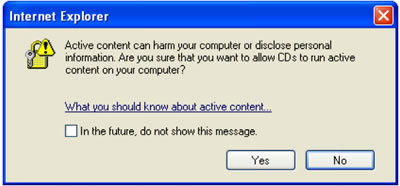
-
Make sure the box is unchecked for "In the future, do not show this message."
-
Select “Yes.”
If you accidentally select “No,” follow these steps:
- Select “Tools” on the top menu.
- Select “Internet Options.”
- Select the “Advanced” tab.
- Scroll down to the “Security” section, and select “Allow active content from CDs to run on my Computer.”
- Select “Apply,” and then select
- Close all instances of Internet Explorer.
- Select “Click_here_to_start_training.htm.”
If you see an ActiveX information message at the top of your window, follow these steps:

- Select “Tools” on the top menu.
- Select “Internet Options.”
- Select the “Advanced” tab.
- Scroll down to the “Security” section, and select “Allow active content from CDs to run on my Computer.”
- Select “Apply,” and then select
- Close all instances of Internet Explorer.
- Select “Click_here_to_start_training.htm.”
If you need to turn off the pop-up blocker, follow these steps:
- Select “Tools” on the top menu.
- Select “Pop-up Blocker.”
- Select "Turn Off Pop-up Blocker."