Note: For a printable version of these instructions, please select one of the following links.
If you see an Active Content warning message, follow these steps:
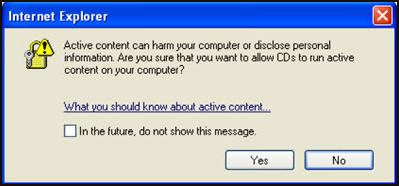
- Make sure the box is unchecked for "In the future, do not show this message."
- Select "Yes."
- Select “Tools” on the top menu.
- Select “Internet Options.”
- Select the “Advanced” tab.
- Scroll down to the “Security” section, and select “Allow active content from CDs to run on my Computer.”
- Select “Apply,” and then select “OK.”
- Close all instances of Internet Explorer.
- Select “Click_here_to_start_training.htm.”